

TLDR - Quick Answer: Most South African small businesses build a website once and never touch it again. This "set-and-forget" approach silently converts your online presence into an easy target due to outdated plugins, unpatched software, and neglected security configurations create vulnerabilities that automated bots exploit within hours of discovery. South Africa is now the third most targeted country for cyberattacks globally, with roughly 577 attacks occurring every hour. For small business website security in South Africa, the question is no longer whether your site could be targeted, it is whether your site is ready when it is. This article explains exactly how the threat works, what it costs when it goes wrong, and what responsible ongoing website management actually looks like.
The Brochure Website Mindset Is Costing South African Businesses
There is a persistent belief among South African small business owners that a website is something you build once. You brief a designer, pay the invoice, launch the site, and move on. The website sits there doing its job like a printed brochure displayed in a window.
The problem is that a website is nothing like a printed brochure. A brochure does not run software. It does not rely on plugins that become vulnerable the moment a developer discovers a security flaw. It does not get automatically scanned by thousands of malicious bots every single day, probing for weaknesses in the code.
This brochure mindset is deeply embedded in how South African SMMEs think about their websites and it is a mindset that hackers, or more accurately the automated tools they deploy, rely on. Small business website security in South Africa cannot be treated as a once-off event. It requires ongoing attention. But most businesses are not giving it any attention at all because nobody ever told them they needed to.
South Africa Is a Primary Target And Small Businesses Are the Easiest Entry Point
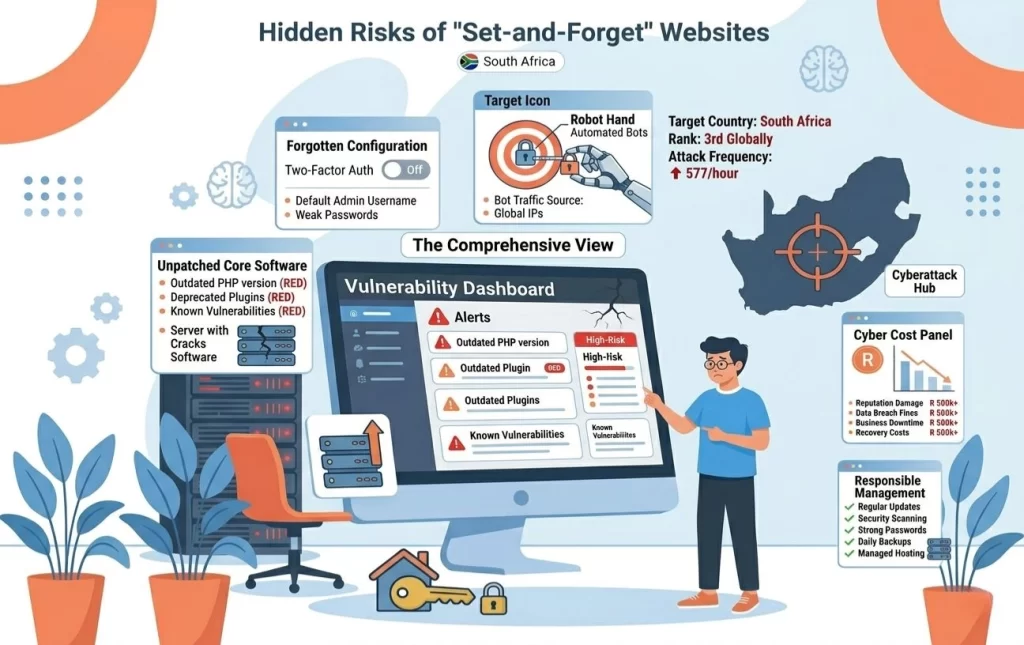
South Africa is now the third most targeted country in the world for cyberattacks, experiencing approximately 577 attacks per hour. This is not a statistic about large corporations and banks. Small and medium businesses account for a disproportionate share of successful breaches precisely because they are easier targets.
When a security vulnerability is discovered in a widely used WordPress plugin, it is typically published in a public CVE (Common Vulnerabilities and Exposures) database within days. Within hours of that publication, automated scanning tools begin sweeping the internet, identifying every website still running the vulnerable version. The tools do not care who you are, what you sell, or how many staff you employ. If your plugin version matches the vulnerable one, your site goes on the list.
This is the single most common cause of small business website compromises not sophisticated, targeted hacking, but simple automated exploitation of known, publicly documented vulnerabilities in software that has not been updated.
The risk for South African SMMEs is compounded by three factors:
- WordPress dominates the local SMME website landscape. WordPress is a solid platform when properly maintained, but its vast plugin ecosystem means the attack surface is wide and inconsistently patched across thousands of sites.
- Budget hosting environments: the default for cost-conscious small businesses often place multiple sites on shared servers, meaning one compromised account can create risk for neighbouring ones.
- The handover model, discussed below, means most of these sites are never updated after the day they launch.
The Handover Problem Nobody in the Industry Discusses
Here is a pattern that plays out consistently across the South African web design industry: A designer builds a website, launches it, and hands the client a set of login credentials. "Here are your keys," they say. And the client; a plumber, a physiotherapist, a cleaning company owner, accepts the keys without really understanding what they are being asked to manage.
This is not a client failure. These business owners hired a web designer because they needed customers to find them online, not because they wanted to learn how to maintain a content management system. Running WordPress updates, monitoring plugin vulnerabilities, checking SSL certificate expiry dates, reviewing file permissions, none of these are skills they have, and none of these tasks fit into a working day already full of running an actual business.
So the site sits. The plugins age. The WordPress core version falls one release behind, then two, then five. The SSL certificate may auto-renew or it may not, depending on the hosting configuration and who set it up. The security posture of that website degrades quietly, month after month, with no visible symptoms, until something goes wrong.
The industry has been conditioned to treat website delivery as a one-time transaction. The designer gets paid, delivers the project, and moves on to the next client. The business owner is left holding keys to a vehicle they do not know how to maintain and have no time to learn. That gap between delivery and ongoing management is precisely where most small business website security failures in South Africa actually happen.
What Hackers Actually Do When They Get In
Most business owners imagine a hacked website means their homepage gets replaced with something alarming; a dramatic message signalling that something has gone wrong. That almost never happens to small business websites. What actually happens is quieter, far more damaging, and often goes undetected for months.
Silent malware injection. Attackers insert code into your website's core files or database. Your site looks completely normal to visitors and to you. Behind the scenes, it may be sending thousands of spam emails using your domain, hosting phishing pages impersonating banks or government services, delivering malware downloads to your visitors, or contributing your server's processing power to a botnet used for larger coordinated attacks.
Google blacklisting. Google continuously crawls the web for unsafe content. When its systems detect malicious code on your site, it adds your domain to the Safe Browsing blacklist and begins displaying a warning to anyone trying to visit: "This site may harm your computer." This warning appears in Chrome, Firefox, and Safari simultaneously. Traffic drops to near zero - sometimes overnight.
SEO ranking collapse. Even before a formal blacklist, Google's algorithms detect anomalous behaviour like spammy links injected into your pages, unusual redirect patterns, or hidden content being served to crawlers that differs from what human visitors see. Search rankings fall. The organic visibility built over months or years evaporates, and recovering it takes far longer than the original hack.
Data compromise. If your website collects any personal information such as contact form submissions, appointment booking details, payment data, a compromised site means that information may have been accessed by an unauthorised party. Under POPIA, this is a notifiable data breach with real legal consequences.
Full site loss. In severe cases, particularly where ransomware or aggressive malware is involved, the site cannot be cleaned. It must be rebuilt from scratch. If no backup exists, every page, every image, every blog post, and every configuration setting is permanently gone.
POPIA and the Legal Dimension of Website Security
South African business owners often assume POPIA applies to large organisations with dedicated compliance teams. It does not. The Protection of Personal Information Act applies to any entity that collects, stores, or processes personal information and a standard contact form on a small business website qualifies.
Every time a potential client fills in your website's contact form, personal information is being collected and stored. If your website is compromised and that data is accessed without authorisation, you face:
- A mandatory breach notification to the Information Regulator of South Africa
- Legal obligations to notify the affected individuals
- Administrative fines of up to R10 million for serious violations
- Reputational damage that extends well beyond the technical incident itself
Website security is a POPIA compliance obligation, not an optional upgrade. Most South African small businesses that collect contact form data and have no active security monitoring are operating in a vulnerable compliance position without realising it. The law does not distinguish between an intentional breach and a negligent one.
The Real Cost of "We'll Deal With It When It Happens"
The "reactive" approach to website security has a predictable financial profile. Businesses that skip ongoing maintenance almost always end up paying significantly more in the event of a security incident than they would have paid for proactive management over the same period.
| Cost Item | Estimated Range |
|---|---|
| Emergency malware cleanup (professional service) | R3,000 – R8,000 |
| Full site rebuild if unrecoverable | R8,000 – R25,000+ |
| Lost revenue during downtime | Variable (often significant) |
| Google blacklist recovery period | 2–8 weeks of sharply reduced traffic |
| POPIA non-compliance exposure | Up to R10 million |
| Domain reputation repair (email deliverability) | Long-term (months of impact) |
These are not worst-case outliers. They represent the consistent outcome for businesses that have left their sites unmanaged for extended periods. The reactive approach is not cheaper, it is a cost that has been deferred, and one that typically arrives with interest.
The pattern holds: businesses that decline a monthly maintenance plan almost always end up facing a larger, unplanned expense down the line. Sometimes they lose the site entirely. The maintenance cost that felt avoidable in month three looks very different in the aftermath of a full rebuild.
What Proper Website Security Actually Looks Like
Effective small business website security is not a product you purchase once. It is a set of ongoing practices that require consistent execution month after month:
Regular software updates. Every WordPress core release, theme update, and plugin patch needs to be applied promptly, ideally within days of release for security-related patches. This is the single most impactful security practice available, and it requires active, ongoing monitoring. Ignoring this step is the root cause of the majority of SMME site compromises.
SSL certificate management. SSL encrypts data in transit between your visitor's browser and your server. Certificates expire, and if auto-renewal fails or was never correctly configured, browsers display an "unsafe" warning to every visitor. This needs active monitoring not just a one-time installation during the original build.
Cloud backup with verified restoration. A backup that has never been tested is not a backup, it is a hope. Proper backup management means maintaining current, versioned copies of your site in a secure cloud environment and periodically confirming that those backups can actually be restored to a live site. Knowing your website can be fully operational again within two business days of a serious incident is a categorically different position from not knowing whether a backup even exists.
Active malware scanning. Automated scanning can detect malicious code injections before Google's crawlers identify them meaning you can address a compromise before it triggers a blacklist warning. The difference between catching malware at detection and catching it post-blacklist is weeks of recovery time and a measurable revenue impact.
Web Application Firewall (WAF). A WAF filters malicious traffic before it reaches your website's application layer. Services like Cloudflare provide accessible WAF configurations that block a substantial proportion of automated attack traffic. This is increasingly standard practice for responsibly managed websites, not a luxury reserved for large businesses.
Access control hygiene. Many small business websites carry dormant admin accounts belonging to previous web designers, contractors, or former staff members. Every unnecessary login account is a potential entry point. Active user account management: reviewing and removing inactive accounts regularly, is a basic but frequently overlooked security practice.
Managed vs. Self-Managed - The Honest Comparison
There are two realistic paths for a South African small business that wants a properly secured website:
Self-managed: The business owner, or a designated staff member, takes responsibility for running updates, monitoring for threats, managing backups, and responding to incidents. For a business owner whose primary focus is running their business, this is rarely practical. The expertise required is non-trivial, the time investment is ongoing and unpredictable, and the consequences of getting it wrong fall entirely on the business.
Professionally managed: A specialist provider takes active responsibility for the full security and maintenance stack: updates, monitoring, backups, and incident response. The client operates their website without needing to engage with any of the technical management. This model removes the handover problem entirely: the designer who built the site continues to own the responsibility for keeping it secure and functional.
The managed model has a cost. But that cost needs to be assessed against a realistic alternative which, for most South African SMMEs currently operating with unmanaged websites, is not free ongoing security. It is a deferred cost that arrives in the worst possible form: a compromised site, a disrupted business, and a bill that exceeds what years of maintenance would have amounted to.
The business owners who end up in the most difficult positions are not the ones who invested in ongoing website management. They are consistently the ones who decided they would handle it themselves, then never got around to it because running a business is already a full-time job.
Not sure if your current website is properly looked after Or what you'd even need to check?
I built a free tool called Markas - a marketing assistant that lives inside ChatGPT.
Ask it about website maintenance, what to look for in a web company, or whether your setup is at risk. Plain-English answers, not a sales pitch. Completely free to use.
Frequently Asked Questions
How do I know if my small business website has been hacked?
Common signs include an unexplained drop in search engine rankings, Google displaying a warning when someone tries to visit your site, unfamiliar pages appearing in Google search results that you did not create, or unusual spikes in server resource usage. In many cases, however, compromised sites display no obvious symptoms, malware can run silently for months without any visible indication. Running your domain through Google's Safe Browsing transparency report or a scanning tool like Sucuri SiteCheck is the most reliable way to check your current status.
Does POPIA apply to my small business website if I only have a contact form?
Yes. POPIA applies to any South African business that collects, stores, or processes personal information and a standard website contact form qualifies as data collection. If your site is compromised and form submission data is accessed by an unauthorised party, you may be legally required to notify the Information Regulator and the affected individuals. Administrative fines for serious violations can reach R10 million.
How often should a WordPress website be updated to stay secure?
At minimum, a WordPress website should be fully updated - core, plugins, and themes, once a month. Monthly maintenance covers the majority of security patches before they can be exploited and is the realistic standard for most small business websites. The real risk is not the gap between updates, it is sites that go six, twelve, or twenty-four months without any updates at all. That is where the majority of small business website compromises in South Africa happen.
What is the difference between regular web hosting and managed hosting?
Standard web hosting gives you server space and leaves responsibility for security updates, backups, and maintenance largely with you. Managed hosting or a fully managed website service means your provider actively handles all of those responsibilities on your behalf, including software updates, malware scanning, cloud backup management, and technical incident response. The managed model removes the security management burden from the business owner entirely and ensures there is always an accountable party responsible for the site's ongoing health.
Can I recover my website after it has been hacked if I have no backup?
Possibly, but recovery without a backup is expensive, time-consuming, and not guaranteed. A professional malware cleanup on a compromised WordPress site typically costs between R3,000 and R8,000. If the damage is irreversible, a full site rebuild may be necessary at R8,000 to R25,000 or more depending on complexity. Having a recent cloud backup is the most reliable safeguard against total site loss, and the difference between a two-business-day restoration and a months-long rebuild is the difference between a manageable incident and a genuine business crisis.
Why would hackers bother targeting a small business website with no financial data on it?
Small business websites are frequently targeted not for what is stored on them, but for what they can be used to do. A compromised site can send spam emails using your domain name damaging your sender reputation and potentially getting your domain blacklisted by email providers. It can host phishing pages impersonating other businesses or government departments. It can deliver malware downloads to your legitimate visitors. It can function as part of a botnet used for large-scale attacks on other targets. Your server resources and domain authority have real, tangible value to attackers regardless of your business size, industry, or the content on your website.